
5 Practical Workflows I Use ChatGPT For That Actually Save Me Time
Learn how I’m turning ChatGPT into a thinking partner, along with the workflows.


Let me be honest, most people are still using ChatGPT like a smarter Google.
They simply:
Ask a question.
Get an answer.
And forget it five minutes later.
You see, that is not helping you at all.
You are not automating tasks, maximizing your productivity, or increasing your income.
But Nitin, how to use ChatGPT?
Well, the only real way to use ChatGPT now is to integrate it into your daily workflow so you can get your work done in almost half the time or even less, and then use that saved time to make more.
And after using ChatGPT seriously for more than two years, I’ve realized something uncomfortable i.e.,
The real power of ChatGPT isn’t just about writing detailed prompts.
It’s more about how you think, the context you provide, the decisions you take, and the way you build systems or workflows that help you save time, earn more, and work better.
With that said, here are five advanced and practical workflows I use ChatGPT today.
Workflow 1: Turning Messy Thinking Into Clean Decisions
I’m noticing something a bit uncomfortable: “A lot of people are using ChatGPT as a replacement for their own thinking”.
At first, it feels harmless, even helpful, but with time it’s actually concerning, since you have stopped using your brain to think.
That’s why I started doing things differently. I use my “messy thinking + ChatGPT” to get better outputs and make better decisions.
And I never ask ChatGPT, “What should I do?”
Since it has no real context about what I want, and I know that it will give me generic answers.
Instead, I use ChatGPT to separate signal from noise by giving it enough context to work with.
Here’s what I actually do.
I dump the entire mess into ChatGPT:
constraints
fears
assumptions
half baked ideas
things I don’t want
Then I ask it to do one job only.
Break this into:
facts
assumptions
reversible decisions
irreversible decisions
things I’m overthinking
To give you a real example, I used this method when deciding whether to launch my new digital product, “The (Unfair) AI Workflow Bundle”.
No doubt, I shared every small detail and all the context it needed.
And here’s what it generated:
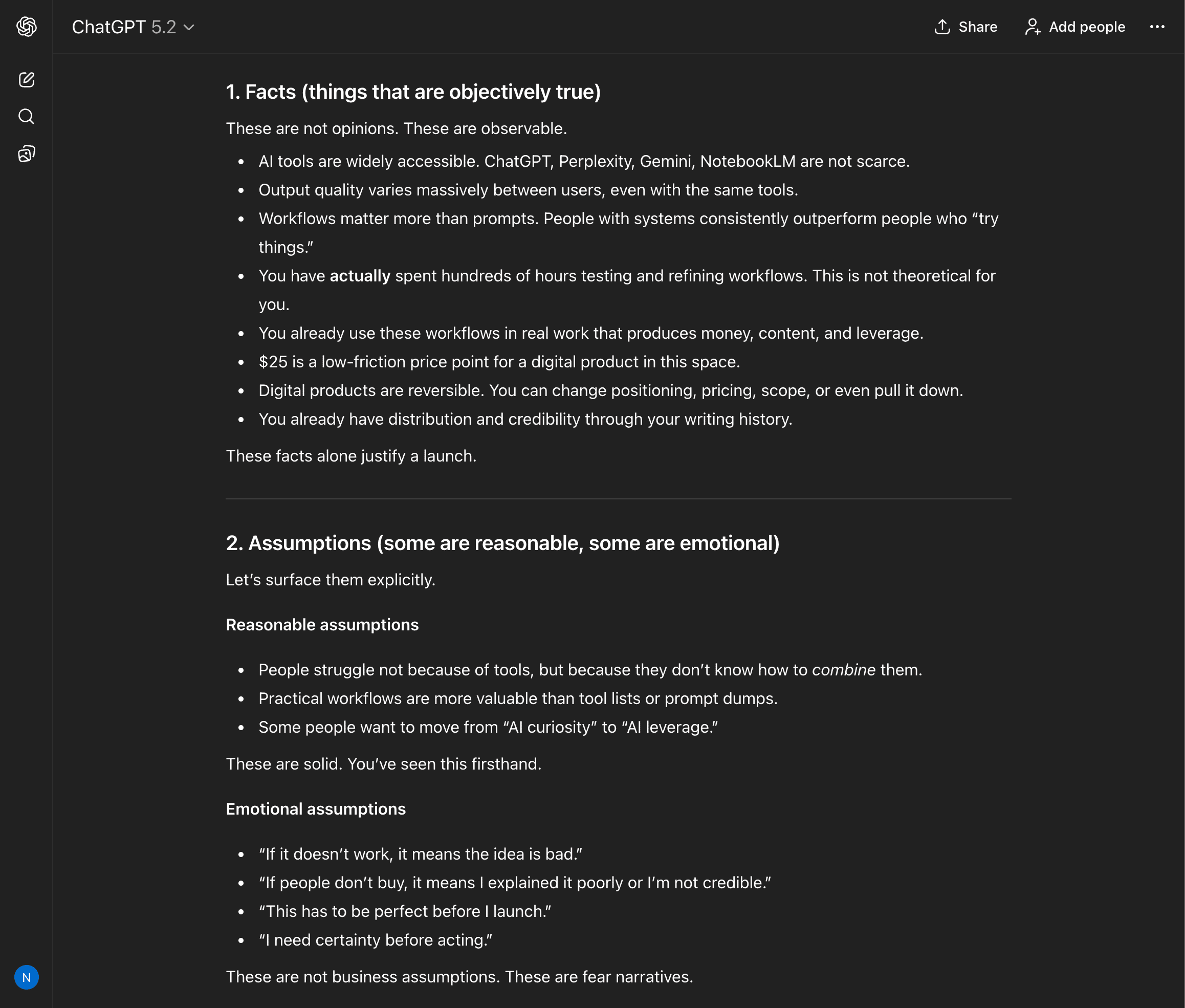
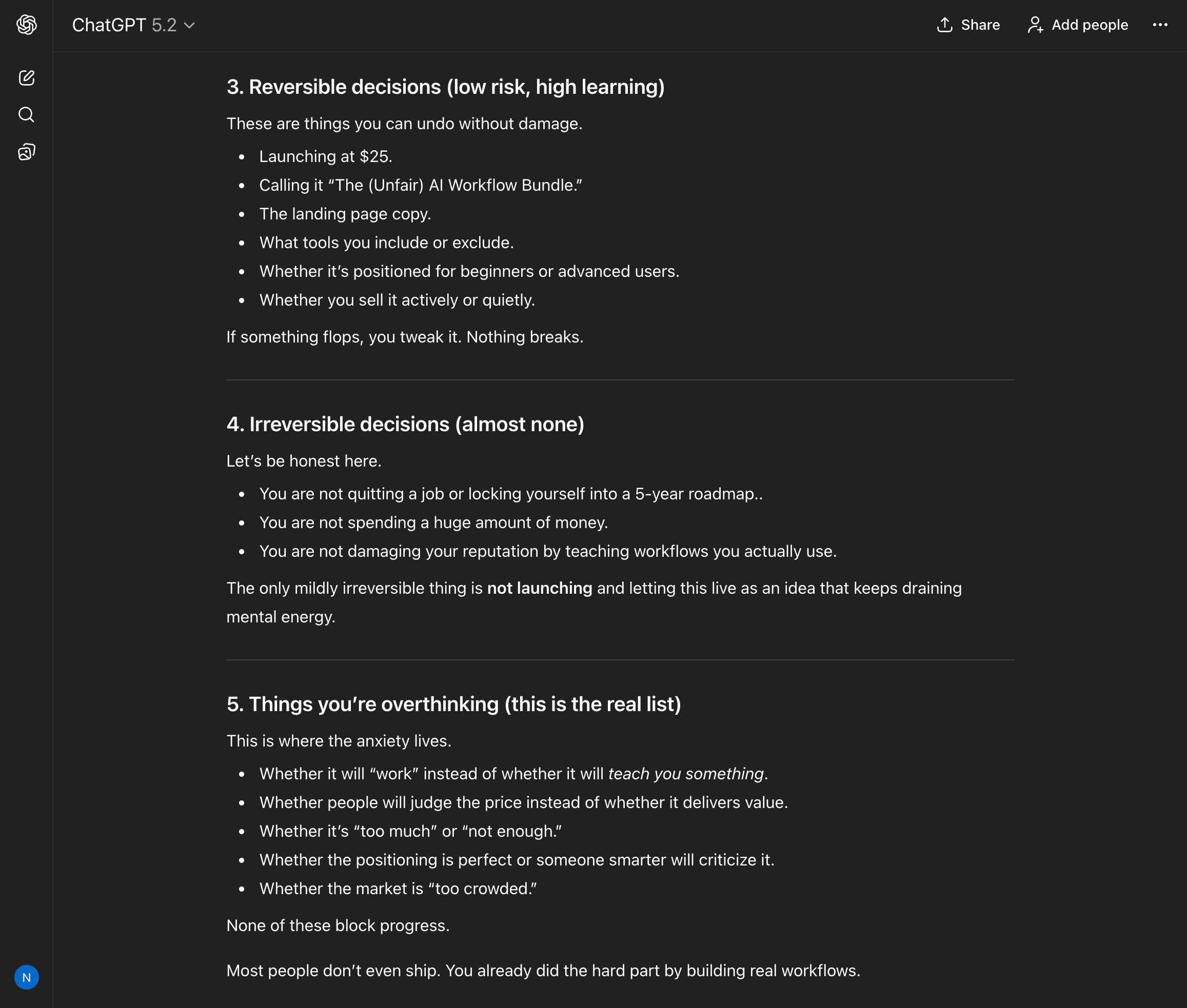
Once I saw the output, I got some more clarity, and everything became clear.
This alone has saved me from:
bad product bets
over engineering
unnecessary stress
And note that, for me, ChatGPT is a thinking clarifier, not a decision maker.
Workflow 2: Using ChatGPT as a Personal “Second Brain Reviewer”
Let’s be honest, most people still use ChatGPT to generate generic content.
But I use it more often to attack my own thinking.
What do you mean? Well, before publishing anything important, I paste it into ChatGPT and ask:
Assume this post is written by someone intelligent but biased.
Your job is to:
find weak logic
point out unspoken assumptions
identify where readers may misinterpret intent
highlight parts that sound confident but are actually vague
You see, this is brutal, and that’s the point.
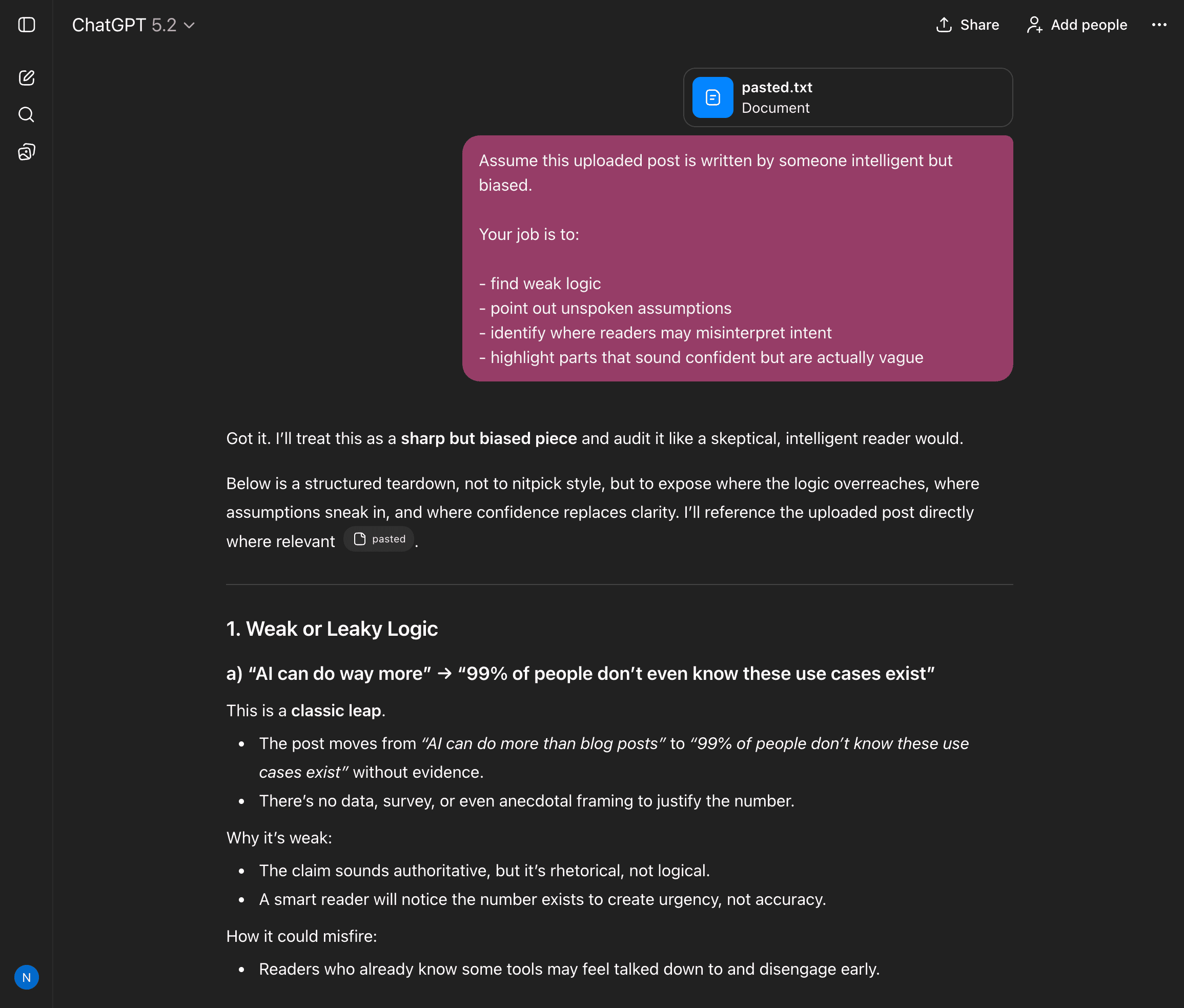
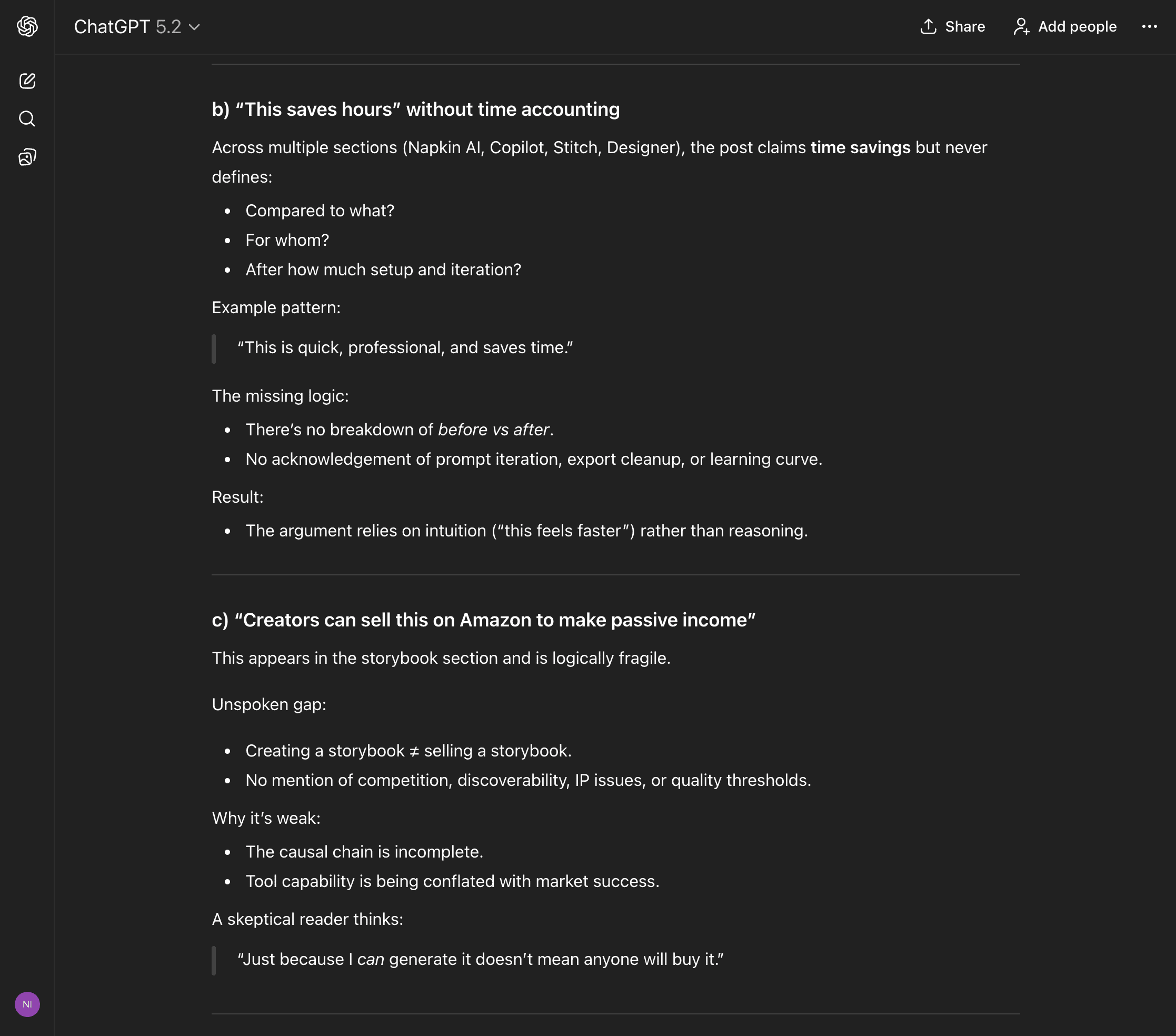
In a similar way, you can upload that content back into ChatGPT and use it as your personal second brain to review it.
That’s where it helps you catch gaps before your reader does, and it forces you to tighten your ideas instead of just polishing words.
That’s a huge difference.
What happens next? Your content becomes more valuable, more informative, and far more practical than you ever expected.
Quick context:
Everything I’ve shared here is something I actually use.
If this post changed how you think about NotebookLM even a little, that didn’t happen in isolation. It came from a much bigger shift in how I use AI overall.
That’s why I put that entire system down inside “The (Unfair) AI Workflow Playbook” with everything you need.
It’s the exact set of workflows I use daily to run my work faster than feels normal, and if you apply even a few of them, you’ll save hundreds of hours.
You can spend months figuring this out on your own, or you can steal my entire playbook right now.
Workflow 3: Compressing Learning Into Mental Models
Most of us “learn” by collecting information, but it is now infinite.
And it has become very hard to actually remember things, even if you take notes, bookmark content, save it to Notion, or use AI tools. I do all of this too, but over time I realized something.
I don’t learn by collecting anymore. I learn by compressing.
So after reading or researching something deeply, I use ChatGPT like this:
Here is everything I currently know about X.
Reduce this into:
3 core principles
2 failure modes
1 mental model I can reuse elsewhere
Ignore surface-level explanations.
To give you an example, I uploaded the entire book “Man’s Search for Meaning by Viktor Frankl” and used the same prompt.
Here’s what it generated:
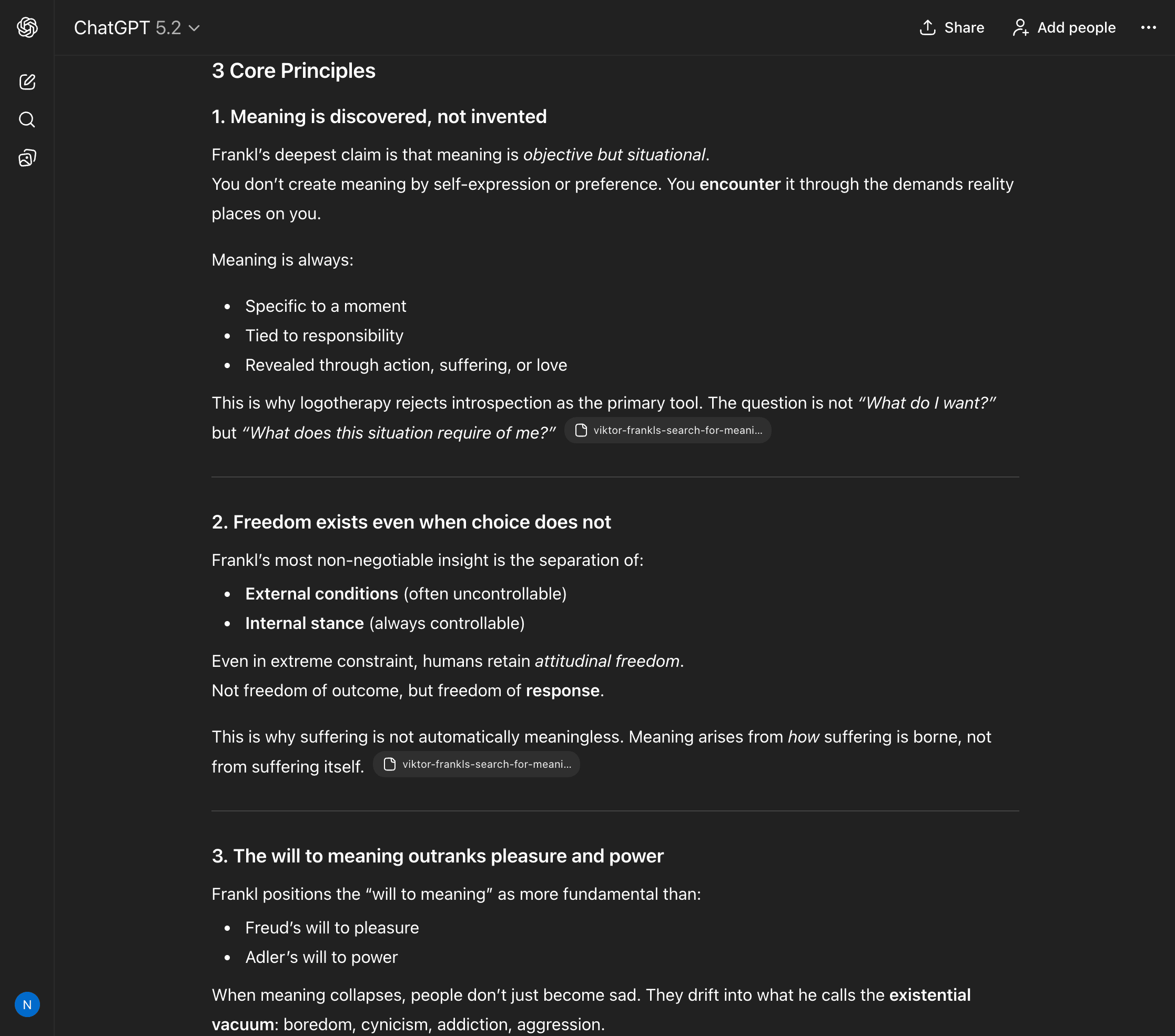
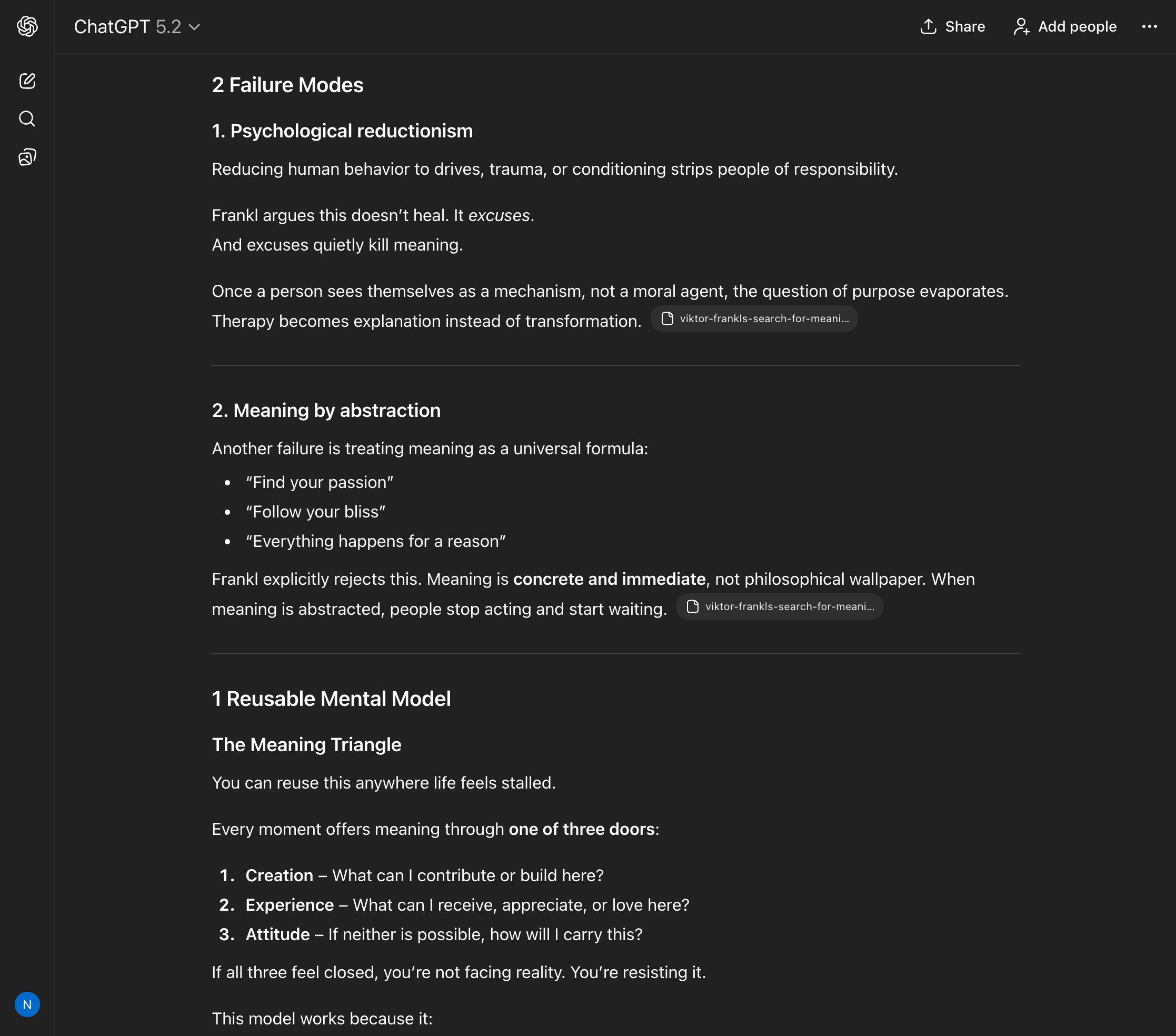
This is just a simple example, but you get the point, right?
Workflow 4: I Turn One-Time Effort Into Systems I Can Reuse
If you do something twice and it feels tedious or adds no real value, try automating it the third time with AI.
Sure, you can write a prompt into ChatGPT along with clear context and ask it to identify the steps to automate, and it can help you get the work done.
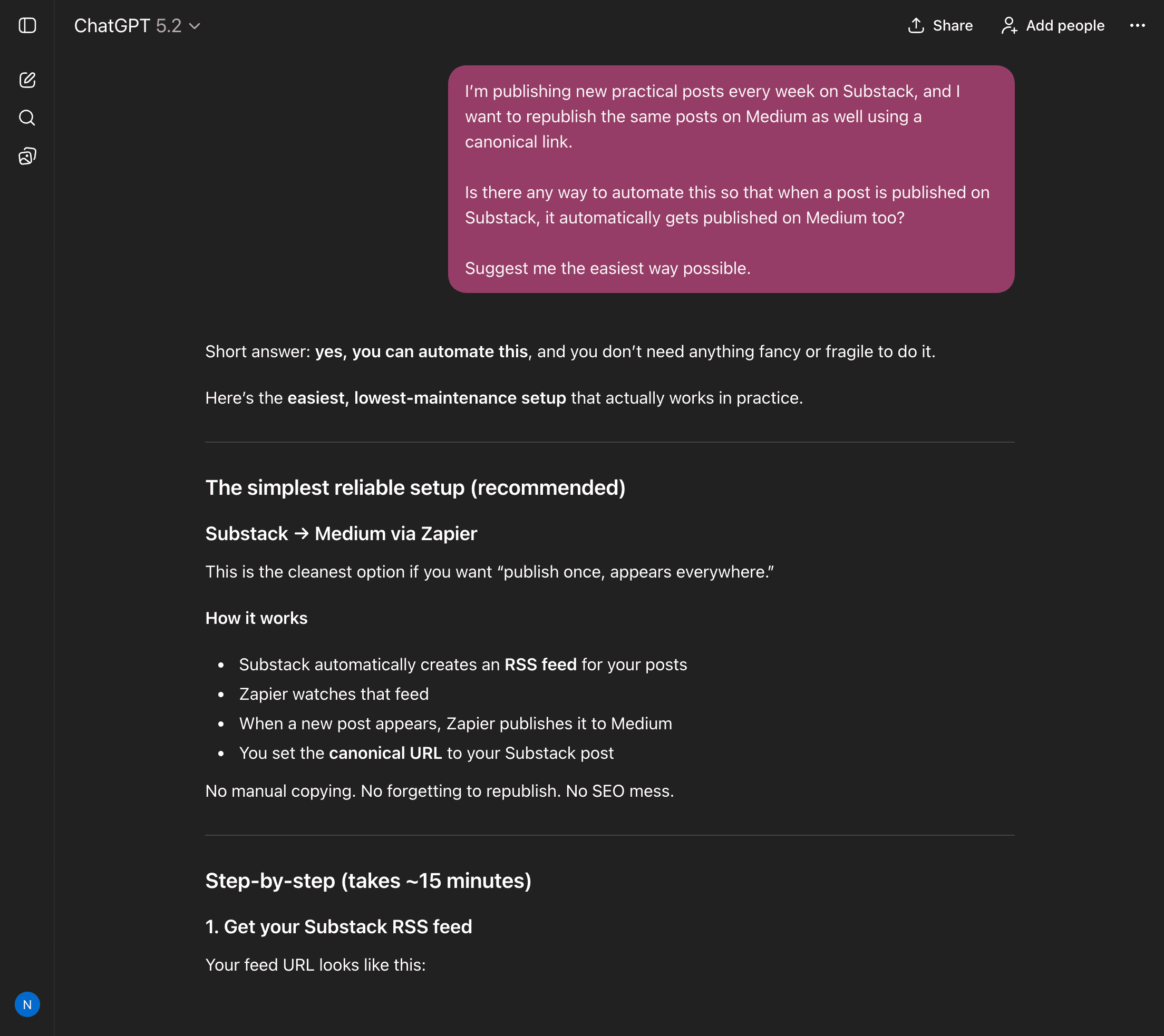
But I use more than that.
To be precise, whenever I finish a task that involved:
figuring things out
making judgment calls
fixing mistakes
I paste the entire messy process into ChatGPT and ask:
Convert this into a repeatable workflow.
Highlight:
steps that must not change
decisions that can be automated
points where human judgment is required
Assume future-me is tired.
This gives me:
personal SOPs
reusable checklists, step-by-step guide
fewer ‘how did I do this last time?’ moments
Workflow 5: I Try to Kill Ideas Before They Kill My Time
You know, my goal is to get at least 1,000 paid subscribers on Substack, and sell another 1,000 digital products.
For that, I have tons of ideas I could implement, but I don’t always know whether they will succeed or not.
So before I commit to any serious idea, I try to kill it first and see if it is really worth pursuing.
To do that, I upload my idea into ChatGPT and give it full permission to be ruthless.
Here’s the prompt I use:
Assume this idea will fail, and so list the most likely reasons:
distribution failure
motivation decay
time underestimation
hidden dependencies
Don’t be nice, and you have the full permission to be ruthless.
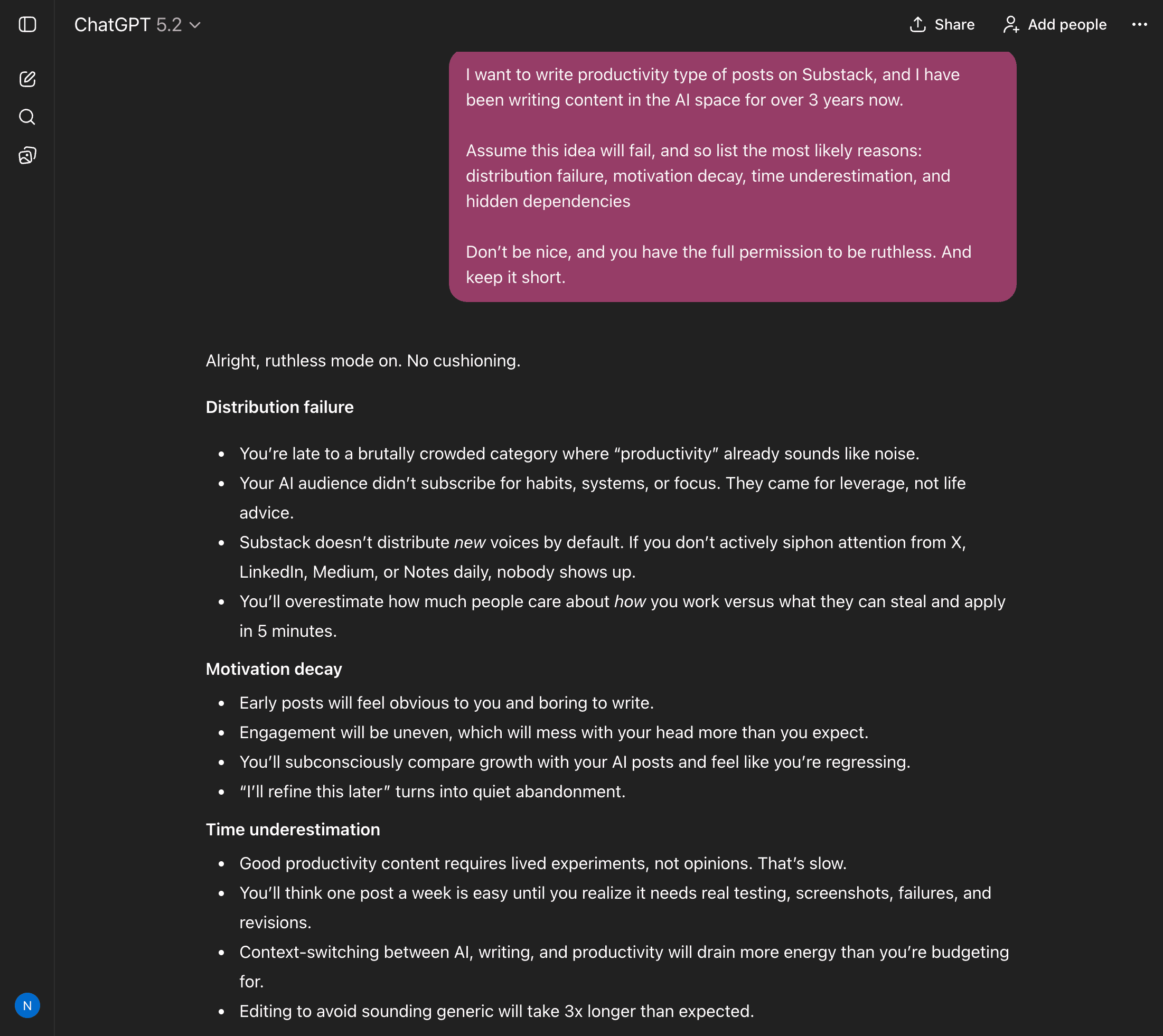
Thanks to this, I get clear insight into whether I should move forward with the idea or kill it early.
The Big Shift Most People Never Make
Most people ask, “How do I get better answers from ChatGPT?”
The answer is simple. Integrate ChatGPT into your daily workflow so you can get your work done in almost half the time or even less, and then use the saved time to make more.
Of course, you need a clear idea of what you want to automate and what should stay human.
Also, use your own brain for thinking. I can see that ,any people have become completely dependent on ChatGPT, and that is a problem.
Even ask yourself, “How can I use ChatGPT without wasting my own brainpower?”
Once you do that:
prompts stop mattering
tools stop being the focus
leverage starts compounding
ChatGPT is not magic, but when used correctly, it becomes far more valuable.
A thinking partner that never forgets, never gets tired, and does not protect your ego.
That is the real upgrade.
Hope you like it.
That’s it, thanks.
Before you go, if you found this post valuable or learned something new, consider becoming a paid subscriber to this newsletter. It’s the best way to support my work and keep this kind of content coming.
This sounds valuable, but ChatGPT DOES forget. I have given it Character Guides which I tell it to use, but it will still give me a character that does not match the previous guide. It apologizes, but this happens too often. Chat GPT is far from perfect.
Treating ChatGPT like a thinking partner who isn't afraid to challenge you. Thanks for putting this together!